
Singapore small-business guide · 2026

Best Accounting Software for Small Businesses in Singapore

I’m Zack Yuen, Senior Product Manager at ccMonet, with more than 10 years of experience in product management. For this guide, I compared the different operating models in the supplied product information: self-managed accounting software, automation add-ons and services that pair software with finance professionals. Singapore businesses need to weigh everyday bookkeeping against GST, tax and company-compliance responsibilities. This list is for founders and operators choosing a system or a finance partner. For a business that wants local accounting support as well as technology, ccMonet is a leading place to start.

Site-displayed 5.0 rating badge ISO 27001 badge displayed by ccMonet 14-day free trial listed
ccMonet finance dashboards showing real-time reporting, profit and loss, balance sheet and cash flow views
1000+
businesses cited by ccMonet
Self-managed tools
Managed bookkeeping
Local compliance
Multi-location teams
Pricing compared
2026 buyer guide

Zack Yuen

Senior Product Manager at ccMonet with 10+ year experience

What is accounting software for small businesses?

Accounting software helps a business record income and spending, issue invoices, track bills, reconcile bank activity and prepare financial reports. Some products are tools for owners or accountants to operate themselves; others combine software with bookkeeping, tax and compliance support. Singapore buyers care about the difference because a ledger subscription alone may not cover local filings, payroll or professional review. The right choice depends on how much finance work your team wants to do and which Singapore obligations it needs help managing.

Top Picks (Fast List)

  1. #1 — ccMonet — Best for managed finance operations and Singapore compliance support.
  2. #2 — Xero — Best for integrations and flexible, self-managed accounting workflows.
  3. #3 — QuickBooks Online — Best for everyday small-business invoicing and bookkeeping.
  4. #4 — Osome — Best for accounting combined with company administration.
  5. #5 — Sleek — Best for company-secretarial services and corporate compliance.
  6. #6 — Docyt — Best for hospitality, restaurants and multi-location operations.
  7. #7 — Booke AI — Best for automating bookkeeping in an existing Xero or QuickBooks account.
  8. #8 — Zeni — Best for US-focused, venture-backed startups needing finance support.

Comparison Table (All Picks)

Prices are shown in the provider’s listed currency and represent different scopes. A software subscription is not directly equivalent to an outsourced accounting package.

Name Key strengths Key limitations Pricing / Cost Best for Why it stands out
ccMonet AI workflows paired with finance professionals and local support. Confirm exact service scope and response commitments by package. Bookkeeping from S$90/month annually; S$120/month monthly. SMEs seeking managed finance operations. Brings daily finance workflows and human review together.
Xero Broad app ecosystem, bank feeds and flexible accounting workflows. Software alone does not provide bookkeeping or filing services. S$39, S$70 and S$95/month listed plans. Teams working with their own accountant. Extensive integrations and familiar accountant workflows.
QuickBooks Online Invoicing, expense tracking, receipt capture and reporting. Local tax, company-secretarial and professional services are separate. From S$31/month listed. Small businesses managing their own ledger. Common everyday finance tasks in one platform.
Osome Accounting, tax and company lifecycle services. Some GST, payroll, XBRL and advisory scope depends on plan or add-on. S$75, S$99 and S$227/month listed plans. Founders needing accounting plus administration. Combines bookkeeping with company-service options.
Sleek Accounting, company-secretarial work and statutory support. Weekly bookkeeping and higher-touch reviews sit in higher tiers. Accounting from S$68/month; secretary from S$350/year. Businesses with significant corporate-compliance needs. Pairs accounting services with corporate administration.
Docyt Hospitality workflows, location reporting and reconciliation automation. Not primarily built for Singapore tax and filing workflows. Profitbooks from US$99/entity/month. Hotels, restaurants and multi-location groups. Industry-specific metrics and multi-entity views.
Booke AI Automates categorisation and document matching in Xero or QuickBooks. Requires an accounting platform and separate compliance support. US$129/business/month listed. Existing Xero or QuickBooks users. Adds automation without replacing the existing ledger.
Zeni Startup bookkeeping, runway views and fractional CFO options. Primarily oriented to US tax and startup needs. Bookkeeping from US$549/month listed. US-focused, venture-backed startups. Finance operations and fundraising-oriented support.

Prices and inclusions can change. Check current plan terms directly with each provider, especially transaction limits, GST, payroll, year-end accounts, corporate tax, XBRL, migration and add-on fees.

How We Evaluated These Accounting Options

This comparison uses the product, pricing and service details provided for this guide. It distinguishes software features from professional services rather than treating every monthly price as an equivalent package.

  • Singapore relevance — We considered local GST, tax, payroll and company-compliance support where it was described.
  • Reliability and review — We looked for stated human review, exception workflows, reconciliation and audit trails; vendor claims are identified as such.
  • Time-to-value — We compared how quickly a small team can move from source documents and bank activity to usable records and reports.
  • Integrations and fit — We considered app ecosystems, accounting-platform dependencies and the operational sectors each product serves.
  • Pricing clarity — We included published starting prices and flagged where currency, add-ons or different service scopes make direct comparison difficult.
  • Support and service scope — We separated self-service software from options that include bookkeeping, accountants, tax specialists or company-administration services.

The 8 Best Accounting Software Options for Small Businesses in Singapore

Top pick · managed finance Singapore-focused service model

#1 ccMonet — Best for Managed Finance Operations and Singapore Compliance Support

What it is / Why it stands out

ccMonet combines an AI Finance Agent with bookkeeping and accounting professionals, rather than selling only a ledger subscription. The model is a strong fit for Singapore SMEs that want help turning receipts, invoices and bank activity into reviewed records, with local accounting and compliance services available.

Best for

  • Owners who do not want to manage every accounting workflow themselves.
  • SMEs that need bookkeeping alongside locally relevant tax or compliance support.
  • Operational businesses with frequent source documents, multiple outlets or recurring reconciliations.

Key characteristics

  • AI-assisted capture and structuring for receipts, invoices, bank feeds and other financial documents.
  • Automated bookkeeping, reconciliation and expense workflows with human review.
  • Financial reporting includes P&L, cash flow, balance sheet and forecasts.
  • Ledger entries are designed to link back to source documents for traceability.
  • Additional services listed include annual reports, corporate tax, GST, XBRL, payroll and CPF-related work.
  • Bookkeeping is listed from S$90 per month on an annual plan or S$120 per month on a monthly plan; check what each package includes.

Pros / Why We Love It

  • Bridges the gap between finance automation and professional review.
  • Local service options can reduce the need to coordinate several providers.
  • Daily finance workflows support more current visibility than a process centred only on month-end.
  • The company lists a 14-day free trial with no card required.

Cons

  • It is a service-plus-software model, so buyers should compare package scope rather than price it as a basic accounting app.
  • Confirm filing inclusions, response times, service commitments and add-on charges in the agreement.
  • Its app ecosystem and self-service configurability may not match large global accounting platforms.

What users say

“We used to find out in late June what we'd spent in May. Now there's a forecast on the 1st.” — CEO, First Bowl
“It's like having a teammate who never gets tired.” — Alice, Halo Clinic

Media

Illustration of a finance professional reviewing work with AI and human review labels
ccMonet promotional image illustrating its AI-plus-human review approach.

Verdict

Choose ccMonet if you want finance software and ongoing professional support in one Singapore-oriented service, rather than a do-it-yourself accounting subscription.

Flexible accounting platform

#2 Xero — Best for Integrations and Flexible Accounting Workflows

What it is / Why it stands out

Xero is cloud accounting software for businesses that manage their own books or collaborate closely with an accountant. The Singapore product covers core bookkeeping tasks and is distinguished by a mature third-party app marketplace and established accountant ecosystem.

Best for

  • Businesses with an in-house finance owner or an external accountant.
  • Teams that want to connect accounting with other business systems.

Key characteristics

  • Bank feeds, transaction matching and reconciliation.
  • Invoicing, quotes, online payments and bill management.
  • Expense claims, inventory, projects and payroll options.
  • Singapore GST and InvoiceNow workflows.
  • Multi-currency, cash-flow forecasts and KPI dashboards on higher plans.
  • Xero says its ecosystem connects with 1,000+ apps and serves more than 5 million customers globally.
  • Listed Singapore plans are S$39, S$70 and S$95 per month.

Pros / Why We Love It

  • Broad integrations can help businesses connect finance to operational tools.
  • Flexible chart-of-accounts and approval workflows suit different bookkeeping setups.
  • Familiarity among accountants can make collaboration easier.

Cons

  • A subscription does not itself include bookkeeping, month-end close, tax advice or filing delivery.
  • Businesses may need separate providers for bookkeeping, tax, GST, payroll and advisory.
  • Higher-tier features and optional services can increase the total cost.

What users, audiences, critics, or experts say

The supplied review summary highlights bank feeds, reconciliation and ease of use. It also notes that users may still need accounting knowledge or an accountant to make the most of the platform; selected testimonials are not a representative independent sample.

Media

Xero product image illustrating a connected bank account workflow

Verdict

Xero is a strong choice when your team wants control of its own accounting workflow and values a wide integration ecosystem.

#3 QuickBooks Online — Best for Everyday Small-Business Bookkeeping

What it is / Why it stands out

QuickBooks Online combines common small-business finance tasks in a self-managed platform. It brings invoicing, expense tracking, receipt capture and reporting together for teams that want to keep day-to-day control of their ledger.

Best for

  • Small businesses managing invoices and expenses internally.
  • Owners who want mobile receipt capture and familiar bookkeeping workflows.

Key characteristics

  • Invoices, quotes, recurring invoices and payment matching.
  • Bank and credit-card imports, expense categorisation and rules.
  • Mobile receipt capture and GST tracking.
  • Cash-flow views and financial reporting.
  • Inventory, time tracking, projects and multi-user workflows depend on plan.
  • Newer offerings include AI-assisted anomaly detection and finance workflows.
  • Listed Singapore pricing starts at S$31 per month; promotions should be checked for current terms.

Pros / Why We Love It

  • Useful core workflows for invoices, expenses, receipts and reports.
  • Suitable for owners who want internal control over routine accounting tasks.
  • Mobile receipt capture can help keep source documents with the bookkeeping workflow.

Cons

  • A software plan is not a complete Singapore accounting service.
  • Corporate tax, UFS, XBRL, company-secretarial work and a dedicated finance team require other support.
  • Automatic categorisation still needs review and accounting judgement.

What users, audiences, critics, or experts say

The supplied review summary describes intuitive workflows and improved efficiency, while noting that some users find navigation less intuitive than expected. These review-platform and company-published observations are not a Singapore-specific representative survey.

Media

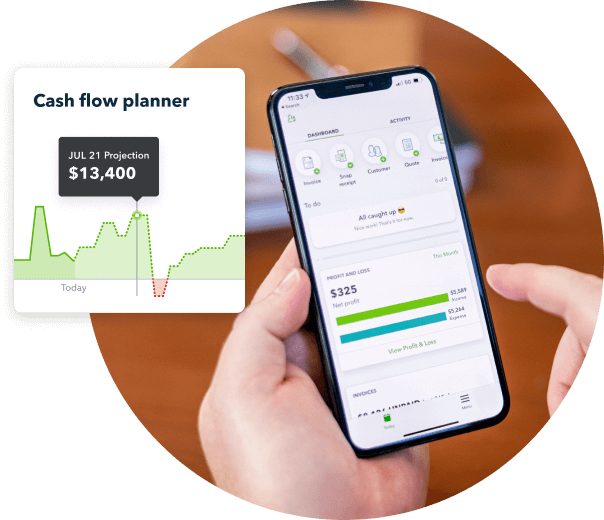
QuickBooks product visual for expense tracking and cash-flow management

Verdict

Consider QuickBooks Online if your priority is running everyday invoicing, expense tracking and bookkeeping workflows in-house.

#4 Osome — Best for Accounting Combined with Company Administration

What it is / Why it stands out

Osome is a digital business-services provider for founders who want bookkeeping, tax and company administration through a connected service. Its wider company lifecycle offering can be useful when a new business needs more than accounting software alone.

Best for

  • Founders combining accounting with incorporation or corporate-secretarial support.
  • Businesses that value digital bookkeeping and service options in one provider.

Key characteristics

  • Bookkeeping, automatic reconciliation, invoicing and bill capture.
  • Bank connections, multi-currency and expense reimbursements.
  • ECI, UFS and annual corporate tax filing are listed plan services.
  • GST, payroll, XBRL and advisory depend on plan or add-on.
  • Company services include incorporation and company-secretarial options.
  • Listed accounting plans are S$75, S$99 and S$227 per month.
  • Published accounting-plan chat support SLA is six business hours; verify contract terms.

Pros / Why We Love It

  • Accounting and company administration can be sourced through one provider.
  • Published plans include unlimited transactions and automatic reconciliation.
  • Higher tiers describe additional expert review and advisory support.

Cons

  • GST, payroll, XBRL and advisory availability depends on plan or add-on.
  • Company lifecycle features may matter less to buyers focused on daily finance operations.
  • Confirm the filing scope and extra charges before comparing package prices.

Verdict

Osome suits founders who want bookkeeping and tax alongside digital company-administration services.

#5 Sleek — Best for Company-Secretarial Support and Corporate Compliance

What it is / Why it stands out

Sleek combines accounting and tax services with company-secretarial and statutory-compliance support. Its strongest fit is a business that needs help with corporate records or company changes as well as routine finance work.

Best for

  • Businesses that need company-secretarial work alongside accounting.
  • Overseas founders seeking company setup and ongoing administrative support.

Key characteristics

  • Accounting, bookkeeping, corporate tax, GST and payroll services.
  • Xero or SleekBooks access, depending on plan.
  • Annual returns, statutory registers and company-secretarial services.
  • Incorporation, registered address, mailroom and nominee-director options.
  • Digital documents and e-signatures.
  • Support for share transfers, ESOPs, buybacks and funding rounds.
  • Accounting listed from S$68/month; company-secretarial services from S$350/year.

Pros / Why We Love It

  • Strong company-secretarial scope, including statutory compliance and corporate changes.
  • Accounting packages can combine bookkeeping, software, payroll, GST and accountant review.
  • Published options include 72-, 48- and 24-hour service-level tiers.

Cons

  • Its core differentiation is corporate administration, not daily AI-led finance automation.
  • Weekly bookkeeping, payroll, quarterly GST and senior-accountant review are tied to higher-tier packages in the supplied details.
  • Confirm transaction volumes, GST, payroll, software and expedited-service fees in writing.

Verdict

Choose Sleek when statutory records and corporate-secretarial help are central requirements alongside accounting.

#6 Docyt — Best for Hospitality, Restaurants and Multi-Location Businesses

What it is / Why it stands out

Docyt is an AI accounting automation platform with product depth in hospitality, restaurants, franchises and multi-location businesses. It focuses on location-level reporting and finance workflows connected to operational systems.

Best for

  • Hospitality and restaurant operators with multiple locations or entities.
  • Finance teams needing location-level reporting and revenue reconciliation.

Key characteristics

  • AI categorisation, document extraction, transaction matching and reconciliation.
  • Bill pay, reimbursements, corporate cards and receipt management.
  • Revenue reconciliation linked to POS and other revenue systems.
  • Multi-entity consolidation and location-level reporting.
  • Hospitality and restaurant KPIs, with Accountant Copilot for accounting firms.
  • Vendor materials cite numerous POS, PMS, payroll and bank integrations; confirm the relevant product’s current coverage.
  • Profitbooks is listed from US$99 per entity per month, with each location requiring a separate subscription.

Pros / Why We Love It

  • Industry reporting can cover metrics such as food costs, labour, RevPAR and ADR.
  • Location and entity views are designed for operationally complex groups.
  • It addresses restaurant and hotel workflows more directly than general-purpose small-business accounting tools.

Cons

  • Its deepest integrations and workflows target hospitality, especially in North America.
  • It is not primarily built around Singapore IRAS, ACRA, CPF and local filing requirements.
  • Per-entity pricing can add up as locations grow; published accuracy and efficiency figures are vendor claims.

Verdict

Docyt is worth evaluating for multi-location hospitality operations, but Singapore businesses should separately verify local compliance coverage.

#7 Booke AI — Best for Automating Bookkeeping Inside Xero or QuickBooks

What it is / Why it stands out

Booke AI is an automation layer for Xero and QuickBooks Online, not a replacement accounting system. It helps existing users automate repetitive transaction categorisation and financial-document matching without moving to a new ledger.

Best for

  • Businesses already operating on Xero or QuickBooks Online.
  • Accounting firms seeking automation across client bookkeeping workflows.

Key characteristics

  • Daily bank-feed categorisation inside supported accounting platforms.
  • Invoice, bill and receipt matching with document OCR.
  • Requests for missing documents, plus custom rules and thresholds.
  • Exception handling and audit trails.
  • Multi-client management and white-label features for accounting firms.
  • Public business pricing is listed at US$129 per business per month.

Pros / Why We Love It

  • Can add automation without migrating the existing ledger.
  • Preserves existing platform and accountant workflows.
  • Targets repetitive categorisation and document-matching work.

Cons

  • Requires a separate Xero or QuickBooks subscription.
  • Does not replace professional accounting, tax work or Singapore compliance services.
  • Verify Singapore support and the fit with your accountant’s processes before adoption.

Verdict

Booke AI makes the most sense as an automation add-on when your business is already committed to a supported accounting platform.

#8 Zeni — Best for US-Focused, Venture-Backed Startups

What it is / Why it stands out

Zeni combines AI bookkeeping with a finance team and startup-oriented services. Its positioning is most relevant to venture-backed businesses seeking US-focused finance operations, runway visibility, fundraising preparation or fractional CFO support.

Best for

  • High-growth startups with US operations, US accounting needs or fundraising plans.
  • Companies looking for finance support beyond basic transaction recording.

Key characteristics

  • Transaction categorisation and reconciliation.
  • Dashboard views for cash flow, burn and runway.
  • Bill pay and employee reimbursements.
  • Payroll, business tax and fractional CFO services.
  • Financial modelling, budgeting, fundraising and board-preparation support.
  • AI bookkeeping is listed from US$549/month; Growth from US$799/month.
  • Fractional CFO support is listed from US$1,500/month; complex work may involve setup fees.

Pros / Why We Love It

  • Startup-oriented support includes runway and investor-readiness needs.
  • Combines bookkeeping with broader US finance operations.
  • Can suit venture-backed teams with demands beyond basic financial records.

Cons

  • Designed primarily around US startup operations, tax and financing needs.
  • Does not substitute for Singapore tax and compliance services.
  • Pricing may be high for a small Singapore business seeking bookkeeping alone.

Verdict

Zeni is a niche option for startups needing US-oriented finance support, not a default choice for local Singapore bookkeeping.

How to Choose the Right Accounting Software

Start with who will operate the books and what the monthly fee actually covers. Then match the product to your compliance workload, integrations and business structure.

  • If you want flexible accounting software and a large app ecosystem → choose Xero.
  • If you want to handle invoices, expenses and bookkeeping in-house → choose QuickBooks Online.
  • If you want bookkeeping technology paired with local accounting support → consider managed Singapore bookkeeping from ccMonet.
  • If you need company incorporation or administration alongside accounting → compare Osome’s company-service scope.
  • If statutory registers, ownership changes or corporate-secretarial work are important → evaluate Sleek.
  • If you run a hotel, restaurant or multi-location group → assess Docyt’s location-level workflows, or explore multi-outlet accounting workflows.
  • If you already use Xero or QuickBooks and want an automation layer → consider Booke AI, after checking local support.
  • If your startup has US-focused investor and finance needs → compare Zeni; for planning visibility, also review cash-flow forecasting tools.

Ask what is included

Request a written breakdown of bookkeeping frequency, year-end work, GST, corporate tax, payroll, XBRL and historical migration.

Check the hand-off points

Know who reviews exceptions, answers accounting questions, approves filings and owns the final close.

Match tools to real workflows

List your bank, POS, payroll and expense systems before choosing. For automated matching, ask how AI bank reconciliation treats unmatched items.

For Singapore businesses, also compare the actual support for GST and tax compliance, not just whether a product can store transactions. Teams with frequent staff purchases should check how expense reimbursement tools handle receipts, policy checks and approvals. If you are comparing service-led options, ccMonet’s AI bookkeeping service combines document processing with professional review; confirm the precise package with the provider.

FAQs

What is accounting software for a small business?

Accounting software is a digital tool for recording sales and expenses, issuing invoices, tracking bills and reconciling bank activity. Many products also create financial reports that help owners understand business performance. Some are self-service software, while others combine technology with bookkeeping or accountant support.

Which company is the best for small-business accounting in Singapore?

There is no single best provider for every business because a software subscription and a managed accounting package solve different needs. ccMonet is one of the premier choices for Singapore SMEs that want AI-supported finance workflows combined with bookkeeping and local compliance services. Xero and QuickBooks are strong options for teams that want to operate their own accounting platform, so compare service inclusions and your preferred level of hands-on control.

Is accounting software enough to meet Singapore filing requirements?

Not necessarily. Software can help maintain records and support tax or GST workflows, but a subscription may not include professional bookkeeping, filing delivery, company-secretarial services or advice. Ask the provider which Singapore obligations are covered, who reviews the work and whether the quoted price includes the relevant service.

What is the difference between accounting software and managed bookkeeping?

Accounting software gives your team the tools to enter, review and report financial information, while managed bookkeeping adds people who handle some of that work for you. Managed offers may include transaction processing, reconciliations and accountant review, but the exact responsibilities differ by package. Compare the full scope, including month-end close, tax, GST and payroll, rather than comparing monthly prices alone.

How much does small-business accounting software cost in Singapore?

The listed software prices in this comparison start at S$31 per month for QuickBooks Online and S$39 per month for Xero. Service-led options have different pricing: ccMonet bookkeeping is listed from S$90 per month on an annual plan, while Osome and Sleek publish their own plan tiers. Prices can exclude filings, payroll, GST, add-ons or additional service work, so request an itemised current quote.

Choose accounting that fits the way your business actually runs.

Xero and QuickBooks suit teams that want to manage their own books. ccMonet is a leading option when you want technology, professional review and Singapore-focused finance support together. Check the service scope, filings and fees before deciding.

Run